Home Office Ergonomics: The Complete Guide to Creating Your Perfect Work-From-Home Setup
Your workspace isn’t just where you work; it’s where your productivity lives and breathes. When you’re working from home, every detail matters, from your sitting posture to the lighting that frames your screen.
The harsh reality? Poor ergonomics isn’t just uncomfortable, it’s costing you. Studies show that 86% of remote workers experience physical discomfort, leading to decreased productivity, chronic pain, and even long-term health issues.
But here’s the good news: creating an ergonomic home office setup doesn’t require a complete overhaul or thousands of dollars. With the right knowledge and strategic investments, you can transform your workspace into a productivity sanctuary that supports your body and mind.
This comprehensive guide covers everything you need to know about home office ergonomics, from essential principles to specific product recommendations that will transform your work-from-home experience.
Why Home Office Ergonomics Actually Matters
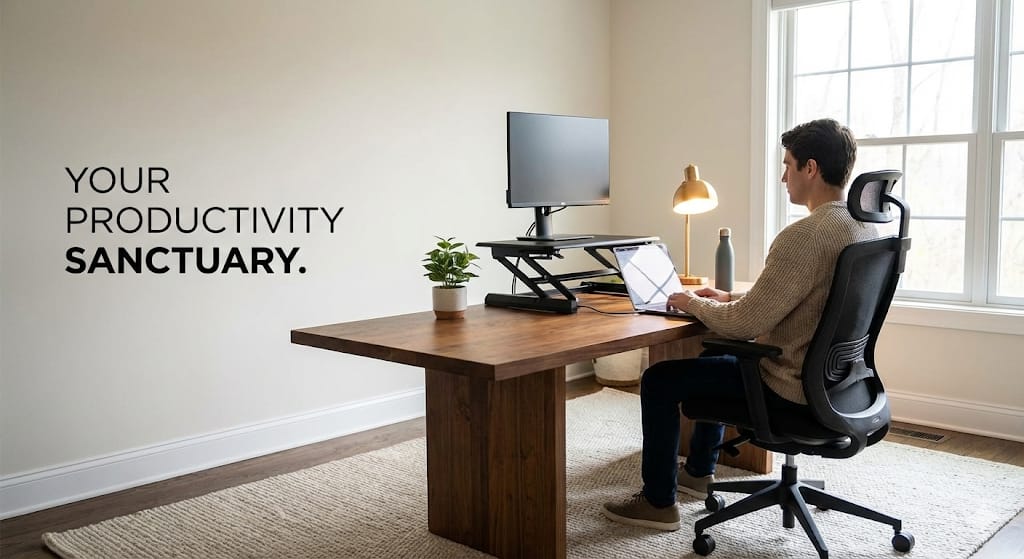
Before diving into products, let’s understand what you’re preventing (or inviting) with your workspace setup.
The Real Cost of Poor Ergonomics
Physical Impact:
- Back pain: 54% of remote workers report chronic lower back pain
- Neck strain: “Tech neck” from poor monitor positioning
- Carpal tunnel syndrome: From improper keyboard/mouse use
- Eye strain: Digital eye fatigue affects 65% of office workers
- Headaches: Often caused by poor posture and screen glare
- Reduced circulation: From prolonged sitting without movement
Productivity Impact:
- 20-40% decrease in work efficiency when uncomfortable
- More frequent breaks are needed due to pain
- Difficulty concentrating when the body is in distress
- Increased sick days and medical appointments
Long-Term Health Consequences:
- Chronic musculoskeletal disorders
- Permanent posture damage
- Increased risk of cardiovascular issues
- Mental health impacts from chronic pain
The Foundation: Your Ergonomic Sitting Position
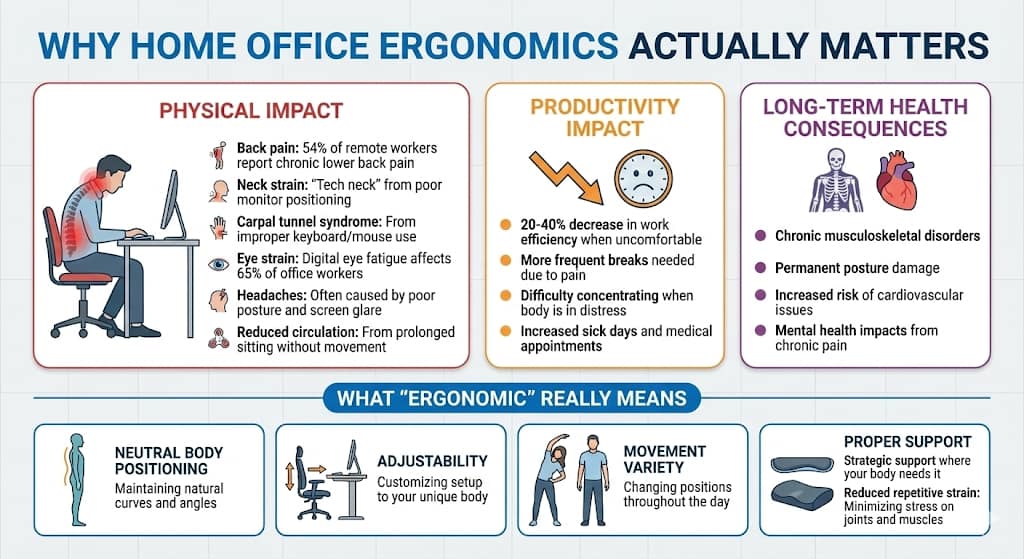
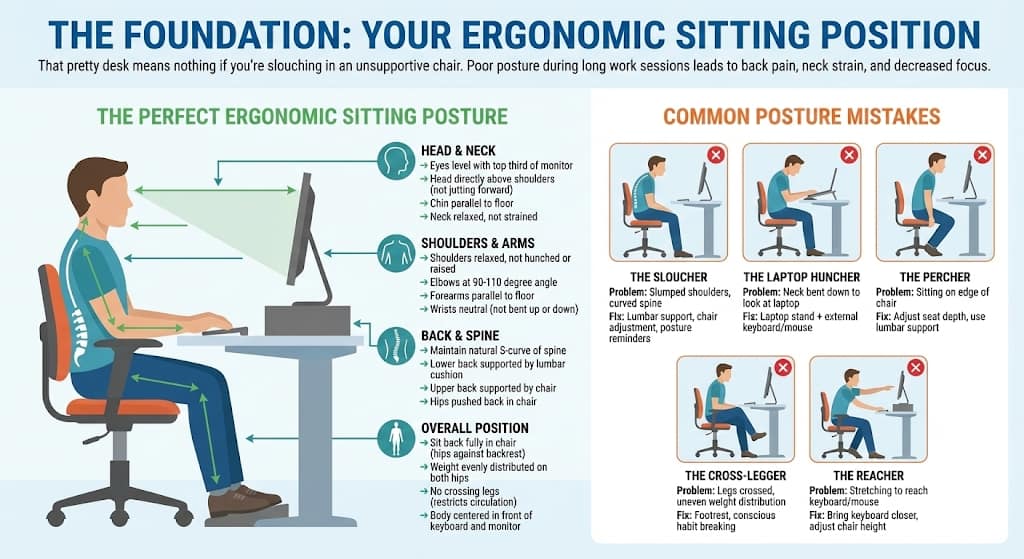
That pretty desk means nothing if you’re slouching in an unsupportive chair. Poor posture during prolonged work sessions can lead to back pain, neck strain, and decreased focus.
The Perfect Ergonomic Sitting Posture
Head & Neck:
- Eyes level with the top third of the monitor
- Head directly above shoulders (not jutting forward)
- Chin parallel to the floor
- Neck relaxed, not strained
Shoulders & Arms:
- Shoulders relaxed, not hunched or raised
- Elbows at a 90-110 degree angle
- Forearms parallel to the floor
- Wrists neutral (not bent up or down)
Back & Spine:
- Maintain natural S-curve of spine
- Lower back supported by a lumbar cushion
- Upper back supported by chair
- Hips pushed back in the chair
Legs & Feet:
- Feet flat on the floor or footrest
- Knees at a 90-100 degree angle
- Thighs parallel to the floor
- 2-3 fingers’ space between the chair edge and the back of the knee
Overall Position:
- Sit back fully in the chair (hips against backrest)
- Weight is evenly distributed on both hips
- No crossing legs (restricts circulation)
- Body centred in front of the keyboard and monitor
Common Posture Mistakes
The Sloucher:
- Problem: Slumped shoulders, curved spine
- Fix: Lumbar support, chair adjustment, posture reminders
The Laptop Huncher:
- Problem: Neck bent down to look at the laptop
- Fix: Laptop stand + external keyboard/mouse
The Percher:
- Problem: Sitting on the edge of the chair
- Fix: Adjust seat depth, use lumbar support
The Cross-Legger:
- Problem: Legs crossed, uneven weight distribution
- Fix: Footrest, conscious habit breaking
The Reacher:
- Problem: Stretching to reach keyboard/mouse
- Fix: Bring the keyboard closer, adjust the chair height
Best Ergonomic Office Chairs: Detailed Reviews
1. Ergonomic Computer Game Desk Chair
This ergonomic desk chair proves you don’t need to spend $1000+ to get proper support. Designed for gamers who sit for extended sessions, it translates perfectly to home office use. Built-in lumbar cushion maintains natural spine curve, preventing lower back pain during 8+ hour workdays.
2. Executive Swivel Rolling Chair with Lumbar Support
This executive office chair brings boardroom elegance to your home office while maintaining serious ergonomic credentials. Perfect for video calls and client meetings. This chair says “I mean business” without the racing stripes of gaming chairs. Contoured backrest naturally supports the lower back curve without bulky cushions. More subtle than gaming chairs but equally effective.
3. Ergonomic Desk Chair (Mid-Range All-Purpose)
The goldilocks of home office chairs, not too fancy, not too basic, just right for most remote workers. Unlike budget chairs with “adjustable” in name only, this offers real customisation like height adjustment
, lumbar depth and height, tilt tension and lock, etc. Works for various body types and preferences. The Switzerland of office chairs—neutral, reliable, universally acceptable.
4. 7-Point Massage Gaming Chair
This luxury ergonomic chair takes home office seating to the next level with built-in massage functionality. Massage doesn’t replace ergonomics. This chair has all standard features like lumbar support, adjustable everything, proper seat depth, and correct back angle.
5. Rocker Floor Gaming Chair
Not everyone wants or needs a traditional office chair. This floor gaming chair offers ergonomic seating at a completely different level, literally. Someone who wants ergonomic support for 2-4 hour work sessions in a casual setting, or as a secondary seating option. But it’s not fora traditional desk, limited work hours, harder mobility, and floor-level only.
Standing Desks & Desk Solutions
Your desk height matters as much as your chair. Let’s explore options for every budget and space.
6. Height Adjustable Ergonomic Home Office Sit Stand Up Desk with Memory Preset Controller
This is the gold standard of standing desks electric height adjustment with memory presets that remember your perfect sitting and standing heights. Manual standing desks require cranking every time you adjust. Result? You stop adjusting. You sit all day.
7. Ergonomic Adjustable Height Desk with Storage
Get standing desk benefits plus storage solutions in one space-saving package. Built-in storage, space-efficient, no electricity, affordable, simpler mechanism.
8. Height Adjustable Electric Standing Desk
Get electric standing desk benefits without the premium price tag. Some users start here, save money, and upgrade to premium after confirming they use it regularly. If you want electric standing desk benefits but can’t afford a premium, this is your answer.
9. Adjustable & Foldable Laptop Riser
Transform your laptop into an ergonomic workstation with this adjustable laptop stand. Raise the laptop so the screen top is at eye level. Simple but life-changing.
10. Ergonomic Detachable Computer Stand
Free up desk space and achieve perfect monitor height with this monitor stand. Fixed height (can’t adjust easily), takes desk space, not as flexible as monitor arms.
Investing in proper home office ergonomics isn’t just about comfort; it’s about protecting your most valuable asset: your health. You don’t need everything at once. Start with the foundation (chair and desk height), then add accessories as budget allows. Your future self pain-free, productive, and healthy, will thank you for the investment you make today in your ergonomic home office setup.
Slip into your comfiest work‑from‑home PJs and make your desk setup feel just as good as it looks. Peek at my favourite cozy picks.