Home Office Ergonomics: The Complete Guide to Creating Your Perfect Work-From-Home Setup
I have been working from home for several years now, and I will tell you what nobody told me at the start: the physical cost of a badly set-up workspace accumulates quietly. So this is my version of The Complete Guide to Creating Your Perfect Work-From-Home Setup.
It does not announce itself on day one. It starts as mild tension in the neck by 3pm. Then a recurring ache in the lower back that you assume is just tiredness. Then you realise you are shifting positions every twenty minutes because nothing feels quite right, and your ability to focus is taking the hit alongside your posture.
I am not someone who dramatically overhauled everything at once. I made changes gradually, one problem at a time, starting with the most obvious ones. A proper chair. Then a laptop stand. Then paying attention to where my screen actually sat relative to my eyes. Each small fix had a noticeable effect on how I felt at the end of a working day.
What I know now is that ergonomics is not a luxury consideration for people with proper offices. It is the baseline for anyone who sits at a desk for several hours a day, which for most work from home setups is every single weekday. Getting it wrong is not just uncomfortable. It compounds over time into the kind of chronic physical issues that are far harder to fix than the setup problems that caused them.
This guide covers everything that actually matters, from the foundational principles to the specific products worth investing in, in the order of priority that makes the most practical sense.
Why Home Office Ergonomics Actually Matters
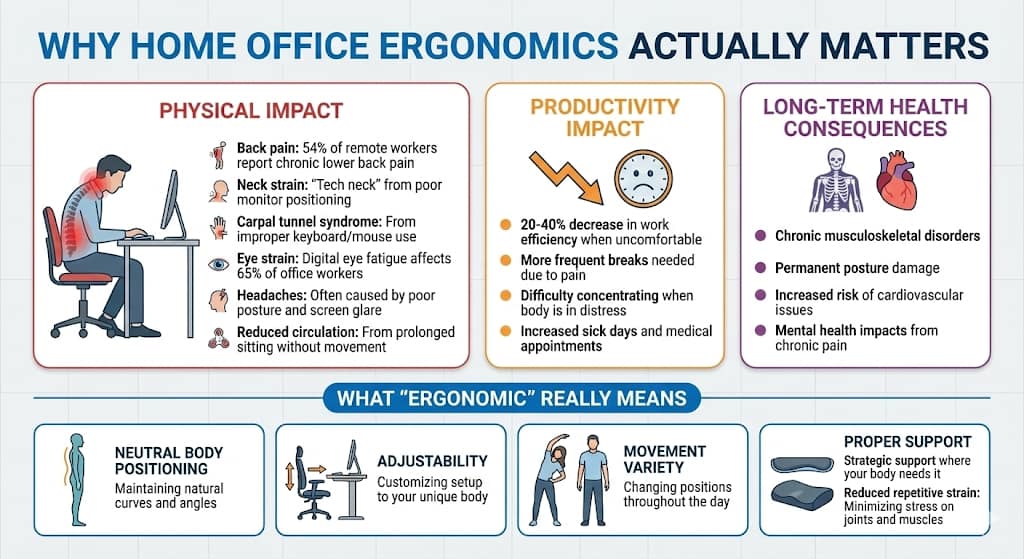
The numbers in that infographic are worth sitting with for a moment. More than half of remote workers report chronic lower back pain. Digital eye fatigue affects the majority of people who work at screens. A 20 to 40 per cent decrease in work efficiency when you are physically uncomfortable is not a small number. That is a significant portion of your productive hours quietly disappearing because your chair is wrong or your screen is too low.
The other thing worth understanding is what ergonomic actually means in practice. It is not a chair brand or a product category. It is a principle: your workspace should fit your body, not the other way around. Neutral positioning, adjustability, movement variety, and proper support are the four pillars. Everything else is just a specific application of one or more of those four things.
The Real Cost of Poor Ergonomics
Physical Impact:
- Back pain: 54% of remote workers report chronic lower back pain
- Neck strain: “Tech neck” from poor monitor positioning
- Carpal tunnel syndrome: From improper keyboard/mouse use
- Eye strain: Digital eye fatigue affects 65% of office workers
- Headaches: Often caused by poor posture and screen glare
- Reduced circulation: From prolonged sitting without movement
Productivity Impact:
- 20-40% decrease in work efficiency when uncomfortable
- More frequent breaks are needed due to pain
- Difficulty concentrating when the body is in distress
- Increased sick days and medical appointments
Long-Term Health Consequences:
- Chronic musculoskeletal disorders
- Permanent posture damage
- Increased risk of cardiovascular issues
- Mental health impacts from chronic pain
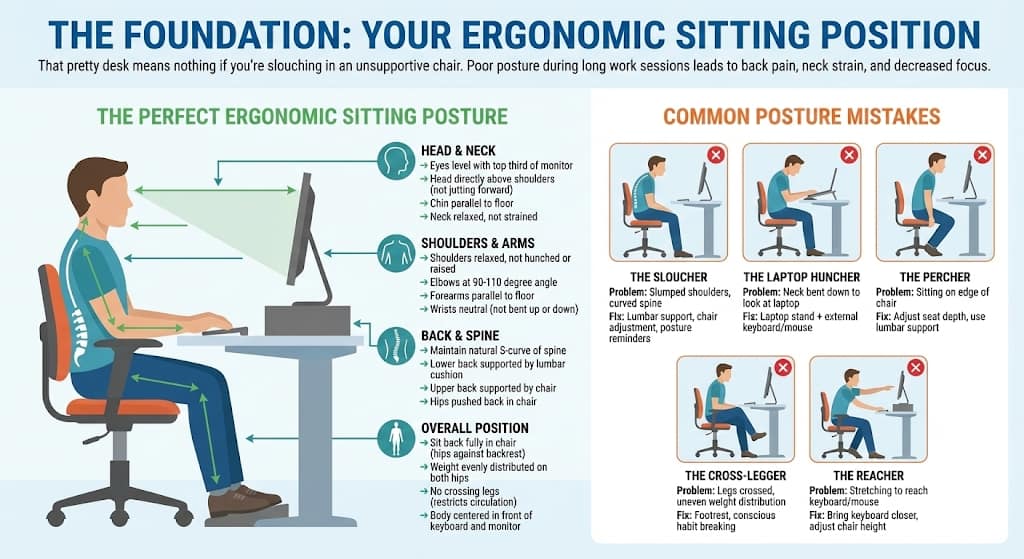
The Foundation: Your Ergonomic Sitting Position
The sitting position diagram above is the standard most ergonomic guidance refers back to, and it is worth understanding before you spend anything on products. Because the most expensive chair in the world will not help if you are sitting in it incorrectly.
The details that matter most in practice: your eyes should be level with the top third of your monitor, not looking down at a laptop on a desk. Your elbows should sit at roughly a 90 to 110 degree angle, which means your desk height and chair height need to work together rather than independently. Your lower back needs support that maintains its natural curve, not forces it straight.
The most common mistake I see described is the laptop huncher, and it was absolutely mine for the first year of working from home. A laptop screen sitting flat on a desk puts your neck at an angle that creates sustained tension across the shoulders and upper back. A laptop stand costs very little and fixes this completely. It is the single highest return investment in this entire guide.
The second most common mistake is the reacher, sitting too far from the keyboard so that your arms extend and your shoulders roll forward. Bring the keyboard close enough that your elbows stay close to your body. It sounds minor. The difference by the end of the day is not minor.
The Perfect Ergonomic Sitting Posture
Head & Neck:
- Eyes level with the top third of the monitor
- Head directly above shoulders (not jutting forward)
- Chin parallel to the floor
- Neck relaxed, not strained
Shoulders & Arms:
- Shoulders relaxed, not hunched or raised
- Elbows at a 90-110 degree angle
- Forearms parallel to the floor
- Wrists neutral (not bent up or down)
Back & Spine:
- Maintain natural S-curve of spine
- Lower back supported by a lumbar cushion
- Upper back supported by chair
- Hips pushed back in the chair
Legs & Feet:
- Feet flat on the floor or footrest
- Knees at a 90-100 degree angle
- Thighs parallel to the floor
- 2-3 fingers’ space between the chair edge and the back of the knee
Overall Position:
- Sit back fully in the chair (hips against backrest)
- Weight is evenly distributed on both hips
- No crossing legs (restricts circulation)
- Body centred in front of the keyboard and monitor
Common Posture Mistakes
The Sloucher:
- Problem: Slumped shoulders, curved spine
- Fix: Lumbar support, chair adjustment, posture reminders
The Laptop Huncher:
- Problem: Neck bent down to look at the laptop
- Fix: Laptop stand + external keyboard/mouse
The Percher:
- Problem: Sitting on the edge of the chair
- Fix: Adjust seat depth, use lumbar support
The Cross-Legger:
- Problem: Legs crossed, uneven weight distribution
- Fix: Footrest, conscious habit breaking
The Reacher:
- Problem: Stretching to reach keyboard/mouse
- Fix: Bring the keyboard closer, adjust the chair height
Best Ergonomic Office Chairs: Detailed Reviews
A note before the chair recommendations: the right chair is not necessarily the most expensive one. It is the one that fits your body and your desk height correctly and that you will actually adjust and use properly. A mid-range chair used correctly will serve you better than a premium chair if you sit in the same fixed position all day.
1. Ergonomic Computer Game Desk Chair
Gaming chairs get a slightly unfair reputation for looking out of place in a home office, but the ergonomic credentials are genuinely serious. Gaming setups involve exactly the kind of extended sitting that remote work does, which is why the support built into these chairs translates well.
The built-in lumbar cushion on this chair maintains the natural curve of the lower spine during long sessions, which is the detail that separates it from budget chairs that offer lumbar support in name only. The headrest takes the weight off the neck and upper back during longer calls or reading-heavy work. At this price point, it is hard to find comparable support.
Shop Ergonomic Gaming Desk Chair
2. Executive Swivel Rolling Chair with Lumbar Support
If you take regular video calls or have a home office that doubles as a client-facing space, the visual of your chair matters alongside its function. This executive chair handles both. The contoured backrest supports the lower back without the bulky external cushions that gaming chairs use, which creates a cleaner profile on screen.
The swivel and rolling function matter more than people expect. Being able to turn and reach without twisting your spine is a small ergonomic detail that adds up across a full working day.
3. Ergonomic Desk Chair (Mid-Range All-Purpose)
This is the chair I would recommend to most people setting up a home office for the first time. Not because it is the best chair available, but because it offers real adjustability at a price point that does not require commitment before you understand what your body actually needs.
Real adjustability means: height that changes meaningfully, lumbar support with actual depth and height settings, and tilt tension that you can feel the difference in. This chair delivers all three. It works for a range of body types and work styles, which makes it the sensible starting point for most setups.
Shop Mid-Range Ergonomic Desk Chair
4. 7-Point Massage Gaming Chair
This sits at the luxury end of the home office chair category, and it is worth being honest about who it is actually for. The massage functionality is not a gimmick for someone who carries chronic tension in the back and shoulders through a long working day. The heat and vibration settings provide genuine relief during extended sessions in a way that a standard chair cannot.
It has all the standard ergonomic credentials: proper lumbar support, full adjustability, and correct seat depth. The massage function is additional rather than a substitute for those fundamentals. If the budget allows and you spend serious hours at your desk, it is worth considering.
5. Rocker Floor Gaming Chair
Not a primary office chair recommendation, but worth including for a specific use case. If you have a secondary working spot, a sofa area, a low coffee table setup, or a space where you do reading-heavy or lighter work, a floor chair with proper back support is significantly better for your spine than a sofa cushion.
The limitation is practical: floor level only, not suitable for a standard desk, and getting up and down repeatedly through a working day is not ideal. But as a secondary option for the 2 per cent of your work that does not require a desk, it earns its place.
Shop Rocker Floor Gaming Chair
Standing Desks & Desk Solutions
Desk height is the variable most people get wrong, and it directly affects everything else in the setup. If your desk is too high, your shoulders rise to compensate. Too low and your neck drops. Either way, the knock-on effect reaches through your entire posture. Getting desk height right is as important as getting the chair right.
6. Height Adjustable Ergonomic Home Office Sit Stand Up Desk with Memory Preset Controller
The reason electric standing desks with memory presets are worth the premium over manual alternatives comes down to friction. Manual standing desks require physical effort to adjust every time you switch positions. That friction means most people stop adjusting. They pick one height and stay there, which removes the primary benefit of having a standing desk at all.
Memory presets eliminate the friction entirely. You press a button, and the desk moves to your saved sitting height or standing height in seconds. That ease of use is what actually changes behaviour. I set a loose rule of standing for at least one hour across my working day, and the only reason it happens consistently is because the transition requires no effort.
Shop Electric Height Adjustable Desk with Memory Preset
7. Ergonomic Adjustable Height Desk with Storage
A standing desk that also solves storage is a practical solution for smaller home office spaces where every surface matters. The built-in storage means your desk can do two jobs without taking up additional floor space, and the manual height adjustment works well for people who have a fairly consistent preferred height rather than switching positions frequently through the day.
8. Height Adjustable Electric Standing Desk
If you want the behaviour change that comes with an electric standing desk but cannot justify the premium version yet, this is the sensible entry point. Some people start here and upgrade once they have confirmed they actually use the standing function regularly. Others find that it does everything they need indefinitely. Either way, it is a lower-risk starting point.
9. Adjustable & Foldable Laptop Riser
The highest return investment in this entire guide is relative to cost. If you work primarily on a laptop and you are not using a stand, your neck is angled down for every hour of every working day. A laptop stand raises the screen to eye level in seconds, and the difference in end-of-day neck and shoulder tension is immediate and noticeable.
Pair with an external keyboard and mouse for a complete ergonomic laptop setup at a fraction of the cost of a full standing desk.
10. Ergonomic Detachable Computer Stand
For desktop setups, a monitor stand serves the same purpose as a laptop stand: bringing the screen to the correct eye level while freeing up the desk surface below for storage. A cleaner desk surface has a measurable effect on focus that is easy to dismiss until you experience it consistently.
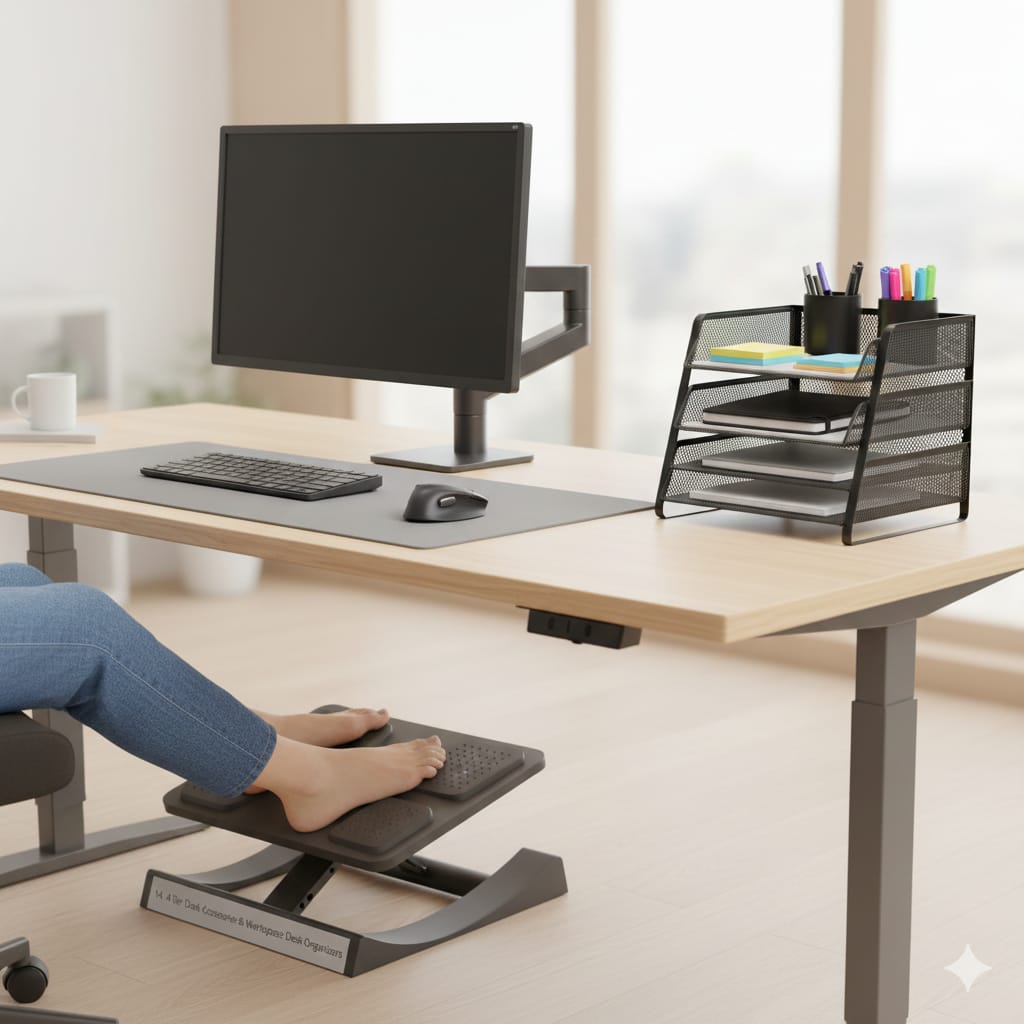
Building an ergonomic home office setup does not have to happen all at once. If you are starting from scratch or fixing a setup that has been causing you problems, the order of priority is straightforward: chair first, then desk height, then screen position, then accessories.
The chair and desk together will resolve the majority of posture issues. A laptop stand, if you use a laptop, is the single cheapest fix with the most immediate return. Everything else, the monitor arm, the wrist support, the standing mat, layers on top of that foundation.
The goal is not a perfect setup. It is a setup that lets you work for several hours without your body registering a complaint by 3pm. That is a reasonable standard, and it is absolutely achievable without spending a fortune or overhauling everything at once.
Your future self, the one sitting at this desk in two years with a healthy back and no chronic neck tension, will consider this a worthwhile afternoon of reading.
Slip into your comfiest work-from-home PJs and make your desk setup feel just as good as it looks. Peek at my favourite cosy picks.


You May Also Like

Brilliant Ways to Upcycle Your Old Baby Crib

Budget-Friendly Diwali Home Decor Ideas That Look Luxe